


កម្មវិធីហាត់វាយអក្សរខ្មែរ — Free Khmer Unicode Typing Practice, Plus 28 More Free Tools
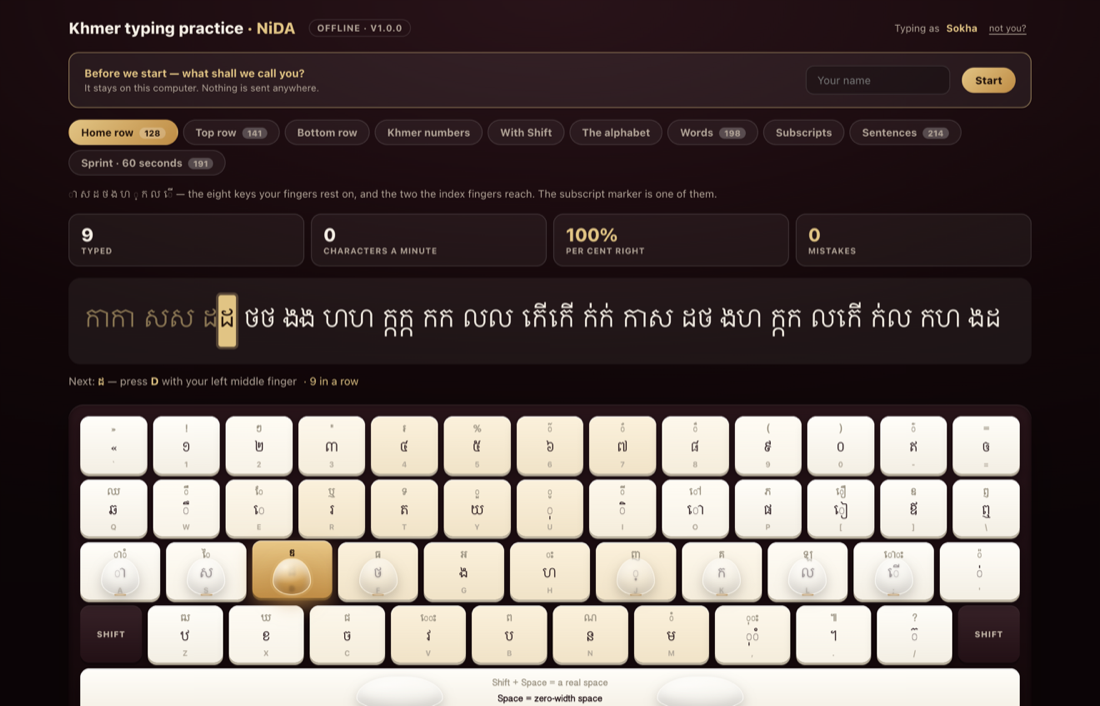
កម្មវិធីហាត់វាយអក្សរខ្មែរ — Khmer Unicode Typing Practice — is free, and it is open in your browser right now. No internet needed after the first load, no account, no cost. Nothing to install: the keyboard fills the screen and you are typing Khmer in about four seconds.
It is the newest of 29 free tools we have now released on this site — ten of them written for Khmer, the rest for anyone running a website in Cambodia. All of them are free to use, with no sign-up, and most do their work inside your own browser rather than on our server.
Type Khmer right now — full screen
Open Khmer typing practice full screen. That is the whole first step.
The page shows the real NiDA keyboard, lights the next key you need in gold, names the finger that should press it, and puts ten translucent fingertips on the board so you can see the reach before you make it — including the opposite little finger going for Shift.
- Ten lessons, from the home row to whole sentences
- A sixty-second sprint with a countdown ring, and a personal best kept for every lesson
- Your own record — best speed, accuracy, characters typed, days practised — kept in your browser and nowhere else
- The drill words are real Khmer, taken from this site's own writing and checked against a 75,056-word dictionary
You do not need a Khmer keyboard to start
This is the step where most people give up: installing a Khmer layout on a machine they may not own. You can skip it here.
The page reads each key by its physical position on the board, not by the letter your operating system thinks is printed on it. So the key under your finger is the key on the chart from the very first keystroke — on a borrowed laptop, in an internet café, on a school computer, on an English keyboard that has never seen Khmer.
When you are ready to type Khmer everywhere else, add the Khmer layout in your system settings. It is the same layout, key for key, so nothing you learn here has to be learnt twice.
Two things the keyboard never tells you
Both of these are invisible on any keycap, and both are taught from lesson one.
- The coeng marker is on J. A subscript consonant is not a special key — it is the coeng marker followed by the letter. ក្រ is three keystrokes, not two.
- The space bar types a zero-width space. In Khmer, the ordinary space bar produces the invisible word divider that Khmer text actually uses. Shift+Space gives you the ordinary space you want between sentences.
Those two facts explain most of what looks broken when somebody starts typing Khmer Unicode for the first time.
Or keep it: the free Mac app
Version 1.0.0, released 24 August 2026. Get it from the free download page.
- Mac app for Apple Silicon — any Mac from late 2020 onward, M1 to M4
- Mac app for Intel — the same application, built for the older processor
- One file for any computer — the whole tutor in a single page you keep on a USB stick, which opens in any browser on Windows, Linux or Mac
It genuinely runs with the internet unplugged. Not "works offline once it has loaded" — inside the packed application there is no request to make at all, and nothing about your practice ever leaves the machine.
One honest note: the Mac app is not signed by Apple, because we do not hold a developer certificate for it. The first time you open it, right-click the app and choose Open rather than double-clicking. After that it opens normally.
On a phone, the practice is put away
If you open the page on a phone you get the keyboard chart on its own, and an "I have a keyboard — let me try anyway" link. That is deliberate. Typing practice is about where your fingers go, and a lesson tapped out with one thumb teaches the wrong habit. The layout is still worth studying on any screen, and the practice will be waiting on the next laptop you sit at.
All 29 free tools
Every one of these is free, needs no account, and lives at /tools/.
Khmer tools
- Khmer typing practice — learn the NiDA keyboard the way it is really laid out
- Khmer writing check — spelling underlined where it is wrong, and the faults a dictionary would never catch
- Khmer word counter — Khmer has no spaces between words, which is why ordinary counters get it wrong
- Khmer Limon converter — old Khmer documents opened, and put back again, in both directions
- Khmer Unicode checker — Khmer that looks right on your screen and breaks on somebody else's
- Khmer character map — every Khmer character, one click from your clipboard, with its code point
- Khmer font previewer — your own words, in every Khmer web font, at the size you will actually use
- Khmer date converter — a date in the forms Cambodian paperwork actually asks for
- Khmer slug maker — a Khmer headline turned into a link somebody would actually paste
- Cambodian phone checker — which network, whether it is valid, and every format you need it in
Domain and email
- WHOIS lookup — whether a domain is free, who holds it, and when it expires
- DNS records — the live records for any domain, straight from public resolvers
- SSL certificate checker — whether a certificate is valid, and exactly how many days remain
- Email deliverability — why your email lands in spam: SPF, DKIM, DMARC and MX in one look
- Domain and certificate expiry — the two dates that take a website offline without warning
Find and be found
- AI readiness — what ChatGPT, Claude and Gemini can actually learn from your website
- llms.txt generator — reads your site and writes the file for you, ready to upload
- Local business readiness — whether an assistant asked for a business like yours in Siem Reap or Phnom Penh could name you
- Sitemap and robots.txt — the two files every crawler asks for first, and the two most often quietly wrong
- Accessibility checker — thirteen things a screen reader needs, and an honest note on what this cannot see
Speed and security
- Server location and speed — where your site is served from, and what that distance costs a visitor in Cambodia
- Security headers — seven headers that cost nothing to add and stop most of what gets done to small sites
- Redirects and mixed content — what actually happens between typing your name and seeing your page
- Broken links — every link on your home page, followed to see whether it still goes anywhere
- Tech stack checker — what a website is built on: the CMS, the framework, the analytics, the CDN
Make something
- QR code generator — a code for a link, a phone number or your Wi-Fi, made in your browser
- Invoice generator — write an invoice, watch it take shape, and save it as a PDF
- Favicon generator — one logo in, every icon a browser and a phone will ask for out
- Image compressor — make your pictures small enough for a phone, with nothing uploaded
Questions people ask
Is the Khmer typing practice really free?
Yes. It is free to use online, free to download, and there is no account to create and nothing to pay. There is no paid tier waiting behind it.
Do I need to install a Khmer keyboard first?
No. The lessons read each key by its position on the board, so you can start on an English keyboard with no Khmer layout installed. Install the layout when you want to type Khmer in other applications.
What is the NiDA keyboard?
It is the Cambodian standard Khmer layout — the one Windows ships as "Khmer (NIDA)". Our chart is parsed from the Windows layout definition itself rather than drawn by hand, so it matches the keyboard your computer already has.
Does it work without the internet?
The downloaded versions do, completely. The Mac app and the single-file version make no network requests at all once they are on your machine.
Why does the space bar type a zero-width space?
Because that is what Khmer text uses between words. Press Shift+Space for an ordinary space.
Can I practise on my phone?
You can study the layout on a phone, but the lessons are hidden there on purpose. Typing practice needs a keyboard your fingers can rest on.
Where do the Khmer words come from?
The spelling behind the drills and the Khmer writing check comes from the SBBIC Khmer word list — 75,056 words, drawn from Chuon Nath and Headley together with the KhmerOS and SBBIC lists, published under the GPLv3. The licence notice ships with the files. A Khmer word list encodes contested spelling decisions, so we name our source rather than claim authority.
Can I use these tools for a client's website?
Yes. There is no licence to buy and no limit on how many times you run them.
Why we give these away
We build websites and mobile apps in Siem Reap and Phnom Penh, and most of these tools started as something we needed ourselves — a Limon document that had to be reopened, a certificate that expired without warning, a Khmer headline that had to become a URL. Publishing them costs us little and saves somebody an afternoon.
The typing tutor is the one we are proudest of. Khmer typing is a daily habit, learning it should not depend on a connection, and in a Cambodian school it often cannot. So it runs offline, it is free, and it always will be.
Start typing now, download it for your Mac, or look through all 29 tools. If something is missing that you would use, tell us — that is how most of these got written.